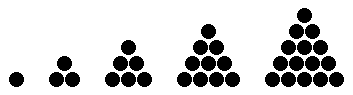
 A triangular number is a number of the form
 1 + 2 + 3 + ... + n n. These numbers are called triangular because,
if you have that many objects, you can arrange them in an equilateral triangle
(see figure).CIT 590 Assignment 1: Number Personalities
Spring 2013, David Matuszek
In this assignment you will write a number of functions for testing characteristics of positive integers, plus one special function named main. Each function other than main will take a single positive integer as an argument, test whether it has some property, and return a value of either true or false.
Put your program on a file named number_personalities.py. Get a copy of the file number_personalities_test.py.
main() functionIn the main function, define a variable 1 through limit,
inclusive. Do not use the number 100 elsewhere; use the variable limit instead. This makes the program easier to change if you later want some limit other than 100.
The main function will call each of the other functions, for each of the numbers 1 through limit, to determine the properties of those
numbers. It will then print out each number, one per line, along with a list of its properties
(on the same line).
Your output should look approximately like this:
    1   composite, happy, triangular, square, not smug, honest
    2   prime, unhappy, not triangular, not square, smug, honest
    3   prime, unhappy, triangular, not square, not smug, honest
    4   composite, unhappy, not triangular, square, not smug, honest
    5   prime, unhappy, not triangular, not square, smug, dishonest
    . . .
The main function doesn't return a value. Each of the other functions is a predicate, that is, a function that returns True or False.
is_prime(n) functionA positive number is prime if its only positive divisors are itself
and one. For example, 7 is prime because it is evenly divisible
by 1 and 7, but not by any number in between (in particular,
it is not evenly divisible by 2, 3, 4,
5, or 6).
A positive number is composite if it is not prime. For example,
10 is composite because it is evenly divisible by 2 and
5; 12 is composite because it is evenly divisible by
2, 3, 4, and 6. As a special case,
1 is considered to be composite.
This function should return True if its argument is a prime number, and False otherwise. Similar statements hold for the other functions.
is_happy(n) functionRepeatedly apply the following procedure to a number:
If by doing this you eventually get to 1, then the number is happy.
For example, if you start with 19:
12 + 92 = 1 + 81 = 8282 + 22 = 64 + 4 = 6862 + 82 = 36 + 64 = 10012 + 02 + 02 = 1 + 0 + 0 = 1
and the number is happy.If instead you get into an infinite loop, the number is unhappy. So if your program runs forever, the number is unhappy. This isn't a very useful test, however. Fortunately, every unhappy number will eventually get into this cycle:
4, 16, 37, 58, 89, 145, 42, 20, 4, ...
so if you get any one of these numbers, say 4, then you can stop
and conclude that the number is unhappy.
is_triangular(n) functionA triangular number is a number of the form n. These numbers are called triangular because,
if you have that many objects, you can arrange them in an equilateral triangle
(see figure).
The first few triangular numbers are 1, 3, 6, 10, 15....
is_square(n) function is a number of the form
 1 + 3 + 5 + 7 + ... + n n.
(The figure should help you understand why this definition is the same as the usual definition of square numbers.)
is_smug(n) functionA number is smug if it is the sum of two square numbers. The first few
smug numbers are 2 (1+1), 5 (1+4), 8
(4+4), 10 (1+9), 13 (4+9), etc.
is_honest(n) functionA number is dishonest if it "pretends" to be a square number,
but isn't one. Specifically, n is dishonest if there is a number k such
that (using integer division), but
k*k is not n. A number is honest if it is not dishonest.
At the end of your Python program (after all your function definitions), insert the following lines:
if __name__ == "__main__":
main()F5 (or choose Run -> Run module) from the menu, IDLE will automatically run your main function. If you are in the IDLE window containing your test cases (supplied) and click F5 or use the menu equivalent, it will run the tests and tell you the results.
Turn in your one Python file by 6am, Friday January 18. Turn in only the file you wrote; don't turn in the supplied test file. As only one file is required, there is no need to zip it.