Using Tkinter in Python, create a GUI with some buttons, a display showing how many times each button was clicked, and a display of which button has been clicked the most.
Here's a little GUI that I wrote for this assignment:
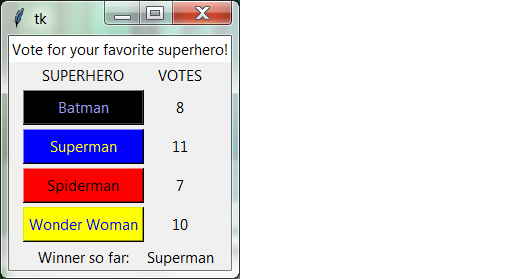
There should be Label at the top, showing who/what you are
voting for.
There should be a Label for each of the two columns (in
this example, "SUPERHERO" and "VOTES".
There should be a column of at least three Buttons, and an
adjoining column of counts (also Labels) showing how many
times the corresponding button has been clicked.
At the bottom of the window, there should be another Label
showing which candidate has received the most votes so far. This should be
updated whenever a "vote button" is clicked. If two more candidates are
tied for first place, just report "Tied".
I used "superheroes" as a theme because I liked the idea of having colored buttons. Batman should obviously be black, Superman should be blue, and Spidey should be red (it isn't as clear what color to use for Wonder Woman). You are welcome to choose another theme--favorite ice cream, presidential race, whatever.
Obviously this is a terrible voting simulator; you can press as many buttons as many times as you like. So what? It's making the GUI that's important.
This is supposed to be an easy assignment. That only works if you follow my strong advice to do only a little bit at a time, and test after every little change and addition. Otherwise you will very quickly end up with an empty or blank GUI and no idea what went wrong.
Perhaps the trickiest part of the assignment is determining which candidate has the most votes, and that's a straight programming problem, not a GUI problem at all.
Try to make a neat GUI, but don't obsess over the details. Make it work before you try to make it pretty.
I like Macs much better than Windows. That said, for whatever reason, buttons on a Mac can have colored text (foreground), but can't have colored background. I did most of my programming on a Mac, then moved to Windows for the finishing touches. You do not have to have colored buttons.
I used two Frames, one for the top message and a second for
everything else. I used a grid for the second frame.
The easiest way to put up vote counts is with Labels. The
program can change the text on a Label by saying my_label["text"]
= "some string".
Buttons are normally just wide enough to hold their text.
You can make them wider to fill all the horizontal space, but how you do
this depends on how they are arranged. If they are packed,
you can add fill=X to the Button constructor.
If they are in a grid, you need to say sticky=W+E
in the call to grid.
No unit tests are needed, because everything is visible.
Turn in your voting-booth.py file by 11:59pm
Tuesday, October 16. Note that this is after the
midterm.
Only files submitted to Canvas will be accepted. I do not accept assignments submitted by email.