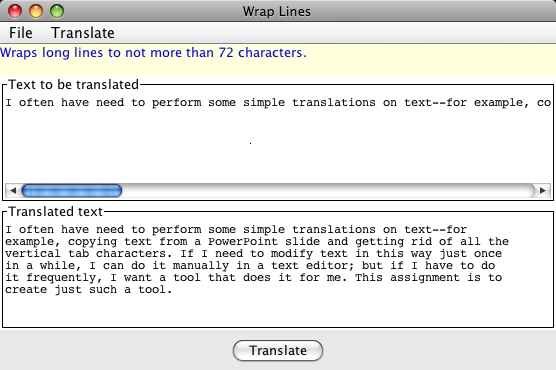
 Create a GUI that looks like this
picture. Your GUI should be resizable.
Create a GUI that looks like this
picture. Your GUI should be resizable. CIT 591 Assignment 11:
General-Purpose Text Translator
Fall 2011, David Matuszek
I often have need to perform some simple translations on text--for example, copying text from a PowerPoint slide and getting rid of all the vertical tab characters. If I need to modify text in this way just once in a while, I can do it manually in a text editor; but if I have to do it frequently, I want a tool that does it for me. This assignment is to create just such a tool.
This program has been designed to make it extremely easy to add new kinds of translations.
Since I want everyone to have some experience creating and working with GUIs, this is an individual assignment (not a team assignment).
Create a GUI that looks like this
picture. Your GUI should be resizable.
The menu items under the File menu should be:
Put these menu items under the Translate menu:
{, indent the next line by 4 spaces. (If two open braces, indent the next line by 8, etc.) }, indent this line by 4 fewer spaces than the previous line; but don't indent less than zero. {...}, they cancel each other out. However, if a closing brace comes before an opening brace, }...{, they do not cancel each other out; both have the effects described above. (Multiple braces? First do all the cancellations you can, then apply the indentation rules according to whatever is left.) Both the upper and the lower text areas should be fully editable. When the user clicks the Translate button, the specified translation is applied to the text in the upper area, and the result replaces any previous text in the lower area. The program never changes any text in the upper area.
As a convenience, whenever a translation type is chosen from the Translate menu, the new translation should be automatically applied; the user should not have to explicitly click the Translate button. (I use this program a lot, and trust me, this really is a convenience.)
Only a single translation is performed at any time, and the text in the lower text area is replaced by a translation of the text in the upper text area. If you want to perform two consecutive translations, you would have to do the first translation, then copy the result from the lower text area, paste it into the upper text area, then do the second translation.addTranslator method The main class should have a void addTranslator(TranslatorInterface
translator) method to do everything necessary to install the various translators. When setting up the GUI, addTranslator should
be called once for each of the eight translators. Here's what the addTranslator method
should do:
TranslateListener for this particular translator (by calling new TranslateListener(translator)), and tell the menu item you just created to add this as an ActionListener.
TranslateListener should be an inner
class of TextTranslator. For each translator you add to the program:
TranslatorInterface, andaddTranslator in your GUI
building method (for example, addTranslator(new TextToPowerpoint());).If you have to do more than this, you are doing it wrong.
Here's what the actionPerformed method of the TranslateListener should do:
Create
an interface TranslatorInterface that
declares the following methods:
String getName();String getDescription();String translate(String text); String[] inputLines =
text.split("\n");TextTranslatortextTranslatorclass TextTranslator extends JFrame
public static void main(String[] args)private void addTranslator(TranslatorInterface
translator)class TranslateListener implements ActionListener
public TranslateListener(TranslatorInterface
                                      translator) // constructor
public void actionPerformed(ActionEvent
arg0) interface TranslatorInterface
String getName();String getDescription();String translate(String text);class IdentityTranslator implements TranslatorInterfaceclass DetabTranslator implements TranslatorInterfaceclass EntabTranslator implements TranslatorInterfaceclass SingleSpaceTranslator implements TranslatorInterfaceclass DoubleSpaceTranslator implements TranslatorInterfaceclass WrapTextTranslator implements TranslatorInterfaceclass FlowTextTranslator implements TranslatorInterfaceclass FixIndentationTranslator implements TranslatorInterfacetranslate method for all classes
that implement
TranslatorInterface (yes, even
including the identity translator!). No other methods need be JUnit tested. All the usual style rules apply. Good Javadoc comments, JUnit tests for all computations, proper formatting and indentation, methods that fit on a single screen, good method and variable names, etc., etc. Use the names and method signatures specified, etc.
Submit your program, as a single .zip file, to Sakai, before 6am, December 9. Be sure your name is displayed in the Javadoc comments for each class.