program consists of:
penup
pendown
should look like:
| CIT 594 Assignment 5: Interpreter, Part I Spring 2004, David Matuszek |
Purposes:
General Idea:
You finally get to see the point of everything we've been doing. In this assignment you will implement an interpreter for a mini-language based loosely on Logo. This is a fun assignment, guys!
Logo is a general-purpose programming language, originally designed for children. The idea is that you write a program to instruct a "turtle" how to walk around the screen; the turtle has colored pens which it drags as it walks, so you can see where it has been. The object is to teach the turtle how to draw various objects: squares, spirals, stars, houses, faces, etc. All important features of a programming language are included.
Details:
You will need a GUI for this assignment. I have provided some starter code; you are free to add to it, change it, modify it in any way you like, or just ignore it altogether.
The GUI should have:
The text area should be completely editable. (Java's java.awt.TextArea
is just fine for this.)
The control panel should have:
Load button, to get a program from a text file.Save button, to save a program to a file.Start button, to tell the program to execute.
Start button should clear the drawing area
before the turtle begins.Pause button, to tell the program to temporarily halt
execution and wait for Start or Stop to be pressed.Stop button, to tell the program to stop whatever
it is doing.Buttons should be grayed out when they are not applicable. For example, the
Start button should be grayed out when there is no program, or
when the program has a syntax error, or when the turtle is already running.
You are welcome to have other controls and display areas as well, so long as they work and their function is clear.
Writing the interpreter:
Clicking the Start button should cause the drawing area
to be cleared and the program interpreted. Then interpret the program.
When the Parser finishes, it should have exactly one (possibly very large) BinaryTree on its stack. That stack should represent the entire program.
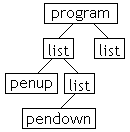
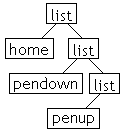
| For example, if the complete program consists of: penup pendown |
Then the BinaryTree should look like: |
|
To interpret the program, you simply interpret the top node. Usually this means interpreting its children, recursively. Almost every type of node will have a little procedure associated with it, to interpret the node (do the thing that that node says to do).
In the following table, I have tried to use the following terminology consistently:
| Grammar rule (partial) | Example input |
The BinaryTree
|
How to interpret this |
|---|---|---|---|
<variable> ::= <name> |
"foo" |
 |
Depends on context. In an <expression>,
look up the value of the variable. In a <set> statement,
assign a value to the variable. See Part II
of this assignment. |
<command> ::= |
"forward 5 \n" |
 |
Evaluate the left child <expression>, and
tell the turtle to move forward that distance. If the pen is down, the turtle
draws; otherwise, it moves without drawing. |
<command> ::= |
"penup \n" |
 |
Tells the turtle to lift its pen, that is, don't draw. |
<command> ::= |
"penup \n" |
 |
Tells the turtle to lower its pen. Future moves will draw lines. |
<command> ::= |
"color red \n" |
 |
Tells the turtle to use the color red |
<command> ::= |
"home \n" |
 |
Tells the turtle to go to the center of the screen and face right. |
<command> ::= |
"set x 5 \n" |
 |
Evaluate the right child <expression> and
save the numerical result in the left child <variable>.
See below. |
<command> ::= |
"repeat 5 [ \n |
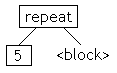 |
Evaluate the right child <expression>.
Then interpret the right child <block> that many times. |
<command> ::= |
"while x < 5 [ \n |
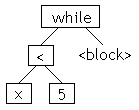 |
Evaluate the left child <condition>. If
true, interpret the <block> and start the
while over again, otherwise do nothing. |
<command> ::= |
"if x < 5 [ \n |
 |
Evaluate the left child <condition>. If
true, interpret the <block>, otherwise do
nothing. |
<command> ::= |
"do foo 5 \n" |
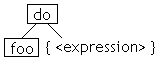 |
Evaluate each <expression> in the right
child <list>, then interpret the procedure <name>
with these values as parameters. See Part
II of this assignment. |
<block> ::= "["
<eol> |
"[ \n |
 |
Evaluate, in order, each left child |
<expression> ::= <term> |
"foo + 5" |
 |
Evaluate both children and add the results. |
<term> ::= <factor> |
"foo * 5" |
 |
Evaluate both children and multiply the results. |
<condition> ::= <expression> <comparator>
<expression> |
"x < 5" |
 |
Evaluate both children and compare the results, getting a
boolean value. |
<procedure> ::= "to"
<name> |
"to foo x y z \n |
 |
Assign values to the left See Part II of this assignment. |
<program> ::= <command> { <command>
} |
penup \n |
|
Save the right |
Program architecture:
The LogoInterpreter (which contains the main method)
walks the parse tree and interprets the commands as necessary. Many of these
will be control commands, such as if, while, and set.
These commands are handled directly by the LogoInterpreter class.
Some commands, such as forward, will cause the turtle to do something.
For each such command, the LogoInterpreter will call a method in
the Turtle class (such as
Some commands that the turtle receives, such as forward and color,
will also affect what is drawn on the screen (the DrawingCanvas).
In these cases, the method in the Turtle class will create a DrawingCommand
to send to the DrawingCanvas. The DrawingCanvas keeps
a Vector of all the DrawingCommands it has received,
and executes them whenever the screen has to be repainted. (This is necessary
because all actual drawing has to be done from the paint() method).
DrawingCommand is an abstract class with one method, apply(),
that implementing classes must define. There should be several implementations
of DrawingCommand; I've provided two, a DrawLineCommand
that you will probably want to keep, and a DrawStringCommand, which
is a throwaway example.
Here is the starter code.
But wait...there's more!
In order to get this posted, I put some of the description on a second page. There you will find:
set commands,do and to),