home

define foo x y z {
  left x
}

CIT 594 Assignment 8:
Interpreter
Spring 2009, David Matuszek
You finally get to see the point of everything we've been doing. In this assignment you will implement an interpreter for a mini-language based loosely on Logo. At last, all your hard work will pay off!
Logo is a general-purpose programming language, originally designed for children. The idea is that you write a program to instruct a "turtle" how to walk around the screen; the turtle has colored pens which it drags as it walks, so you can see where it has been. The object is to teach the turtle how to draw various objects: squares, spirals, stars, houses, faces, etc. All important features of a programming language are included.
You will need a GUI for this assignment. I have provided some starter code; you are free to add to it, change it, modify it in any way you like, or just ignore it altogether and write your own. But please, don't lose any functionality!
The GUI should have:
The text area should be completely editable. (Java's
java.awt.TextArea is just fine for this.)
The control panel should have:
Load menu item, to get a program from a
text file.Save menu item, to save a modified program
to a file.Save As... menu item, to save a program to
a different file.Start button, to tell the program to execute.
Start button should clear the drawing
area before the turtle begins.Pause button, to tell the program to temporarily
halt execution and wait for Start or Stop to be
pressed.Stop button, to tell the program to stop whatever
it is doing.Buttons and menu items should be disabled when they are not
applicable. For example, the Start button should be grayed out
when there is no program, or when the program has a syntax error, or when the
turtle is already running.
You are welcome to have other controls and display areas as well, so long as they work and their function is clear. I've done some of this, but you can do more.
Clicking the Start button should cause the drawing
area to be cleared and the program interpreted. Then tokenize, parse, and
interpret the program.
When the Parser finishes, it should have exactly one (possibly very large) Tree on its stack. That stack should represent the entire program.
For example, if the complete program consists of:
|
Then the Tree should look like: |
To interpret the program, you simply interpret the top node. Usually this means interpreting its children, recursively. Almost every type of node will have a little procedure associated with it, to interpret the node (do the thing that that node says to do).
In the following table, I have tried to use the following terminology consistently:
| Grammar rule (partial) | Example input |
The Tree
|
How to interpret this |
|---|---|---|---|
<variable> ::= <name> |
"foo" |

|
Depends on context. In an
<expression>, look up the value of the variable. In a
<set> statement, assign a value to the variable. See
below. |
<command> ::= |
"forward 5 \n" |

|
Evaluate the left child <expression>,
and tell the turtle to move forward that distance. If the pen is down,
the turtle draws; otherwise, it moves without drawing. |
<command> ::= |
"penup \n" |

|
Tells the turtle to lift its pen, that is, don't draw. |
<command> ::= |
"penup \n" |

|
Tells the turtle to lower its pen. Future moves will draw lines. |
<command> ::= |
"color red \n" |

|
Tells the turtle to use the color red in any future drawing. |
<command> ::= |
"home \n" |

|
Tells the turtle to go to the center of the screen and face right. |
<command> ::= |
"set x 5 \n" |

|
Evaluate the right child <expression>
and save the numerical result in the left child
<variable>. See below. |
<command> ::= |
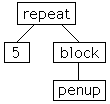
"repeat 5 [ \n |
|
Evaluate the right child <expression>.
Then interpret the right child <block> that many
times. |
<command> ::= |
"while x < 5 [ \n |

|
Evaluate the left child <condition>.
If true, interpret the <block> and start
the while over again, otherwise do nothing. |
<command> ::= |
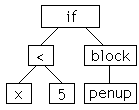
"if x < 5 [ \n |
|
Evaluate the left child <condition>.
If true, interpret the <block>, otherwise
do nothing. |
<command> ::= |
"call foo 1, 2, 3\n" |

|
Evaluate each <expression> in the
right child <list>, then interpret the procedure
<name> with these values as parameters. |
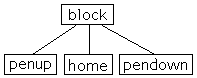
<block> ::= "[" <eol> { <command> } "]" <eol> |
"[ \n |
|
Evaluate, in order, each child of the block. |
<expression> ::= <term> {
<add_operator> <term> } |
"foo + 5" |

|
Evaluate both children and add the results. |
<term> ::= <factor> {
<multiply_operator> <factor> } |
"foo * 5" |

|
Evaluate both children and multiply the results. |
<condition> ::= <expression>
<comparator> <expression> |
"x < 5" |

|
Evaluate both children and compare the results, getting a
boolean value. |
<procedure> ::= "define" <name> { <variable> }
<eol> |
"define foo x y z \n |

|
Assign values to the formal parameters, then interpret the block. |
<program> ::= <command> {
<command> } { <procedure> } |
"penup \n |
|
Save the right |
The Logo class (which contains the main
method) creates and calls an Interpreter, which then
walks the parse tree and interprets the commands as necessary. Many of these
will be control commands, such as if, while, and
set. These commands are handled directly by the
Interpreter class.
Some commands, such as forward, will cause the turtle to do
something. For each such command, the Interpreter will call a
method in the Turtle class (such as public void
forward(int n)). The turtle will then change its state as
necessary.
Some commands that the turtle receives, such as forward and
color, will also affect what is drawn on the screen (the
DrawingArea). In these cases, the method in the
Turtle class will create a TurtleCommand to send to
the DrawingArea. The DrawingArea keeps a
Vector of all the TurtleCommands it has received,
and executes them whenever the screen has to be repainted. (This is necessary
because all actual drawing has to be done from the paint()
method).
TurtleCommand is an interface with one method,
execute(), that implementing classes must define. There should
be several implementations of TurtleCommand; I've provided a
DrawStringCommand, which is a throwaway example to use as a
model for your own commands.
Here is the starter code.
An interpreter or compiler needs to keep track of variables. A compiler needs to keep track of the locations (machine addresses) of variables, while an interpreter needs to keep track of the values of variables.
The way this is done is with a symbol table, usually implemented as
a hash map. Use a HashMap<String, Double> for this
purpose.
So here's all you need to do. Whenever you are evaluating a
<factor> and you want to get the value of a variable, look
it up in the hash map. Whenever you are evaluating a <set>
command and you have a value you want to save in a
<variable>, put the variable/value pair into the hash
map.
Some additional points:
<variable> is the only place in the grammar (that I
can think of) where you have to evaluate something in two different ways
(getting the value, and setting the value).null value back from the hash map, that means
you never put this variable into the table. If you are trying to fetch
the value of a variable, this is an error in the Logo program.First of all, you should get the rest of your program running reasonably well before you attempt procedures.
The keyword define defines a procedure. The
call command calls a procedure. Procedures consist of a
list of commands, just like the rest of the program, but you have to do extra
work to sort out the procedures from the rest of the program, and keep track
of parameters.
A <procedure> is represented as a subtree of the
parse tree produced by your Parser. You need to find the subrees representing
these procedures and keep track of them separately, by name.
The best approach is to set up a separate hash map of procedures. Step
through the right-hand side of your <program> tree and,
for each <procedure> (define node),
put it in the hash map. The <name> of the procedure will
be the key (we won't allow more than one procedure with the same name), and
the whole procedure (rooted at the define node)
will be the value. It doesn't matter whether you take the procedure out of
the program tree or just leave it there.
Procedures can have parameters, and can be recursive. This means that each time you call a procedure, you need to create a hash map to keep track of its parameter values. Since one procedure can call another, you need to keep all these hash maps on a stack.
When you encounter a call command:
<expression>s in the
call command.header node of the procedure you found in step 1).define node found in step 1).In the absence of procedures, we need only a single hash map in which to keep variables. But once we introduce procedures, we need a notion of "scope." Because we don't have an explicit mechanism to declare variables, as in Java, we will need somewhat different scope rules. In our language, we will have exactly two scopes: local (to the current procedure) and global (in the "main" program).
Because procedures can call other procedures, we need a stack of hash maps, one hash map for each procedure invocation. The scope of a variable depends on what hash map it is in. Only two hash maps will be active at any given time: the global hash map, and the hash map at the top of the stack, for the current procedure invocation. Other hash maps on the stack can be ignored.
Parameters are local. Each time we enter a procedure, we create a new hash map for it. We evaluate the actual parameters, and put their values into the new hash map, as the values of the corresponding formal parameters. This is the same as the way things are done in Java. Other variables behave as follows:
Variables managed in this way won't follow the same scope rules as variables in Java, so don't expect them to. Also, notice that these scope rules result in some very odd behavior: You might call a procedure, then define a variable in the main program, then call the procedure again. The first procedure call will use a local variable, and the second one will use the global variable.
The standard JUnit package is not designed for GUI testing. For this
assignment, please include the JUnit tests for Token,
Tokenizer, Tree, and Parser (but not
Recognizer). You can correct and augment these tests if you
like.
Also include one Logo program (call it sample.logo) that we
can run. This program should showcase all the features of the language, and
should draw something interesting. We will also want to run our own Logo test
programs, so make sure that we can use the Load button to
replace the current Logo program--we don't want to have to stop and restart
your interpreter!
Interpreter for everything except procedures: Thursday, April 9, before midnight. This part will be worth 100 points.
Complete Interpreter, including procedures: Thursday, April 16, before midnight. This part will be worth an additional 50 points.